




Lorem ipsum dolor sit amet, consectetur adipiscing elit. Etiam eget ligula efficitur,
accumsan magna vitae, lobortis turpis. Suspendisse gravida, augue et vestibulum ultricies,
tortor neque condimentum lacus, quis tincidunt nisl est sit amet diam.
Bootstrap is a free and open-source CSS framework
 25 Sep 2019
Bootstrap is a free and open-source CSS framework directed at responsive, mobile-first front-end web development. It contains HTML, CSS and (optionally) JavaScript-based design templates for typography, forms, buttons, navigation, and other interface components
Bootstrap is an HTML, CSS and JS library that focuses on simplifying the development of informative web pages (as opposed to web applications). The primary purpose of adding it to a web project is to apply Bootstrap's choices of color, size, font and layout to that project. As such, the primary factor is whether the developers in charge find those choices to their liking. Once added to a project, Bootstrap provides basic style definitions for all HTML elements. The result is a uniform appearance for prose, tables and form elements across web browsers. In addition, developers can take advantage of CSS classes defined in Bootstrap to further customize the appearance of their contents. For example, Bootstrap has provisioned for light- and dark-colored tables, page headings, more prominent pull quotes, and text with a highlight.
What is Bootstrap?
- Bootstrap is a free front-end framework for faster and easier web development
- Bootstrap includes HTML and CSS based design templates for typography, forms, buttons, tables, navigation, modals, image carousels and many other, as well as optional JavaScript plugins
- Bootstrap also gives you the ability to easily create responsive designs
What is Responsive Web Design?
Responsive web design is about creating web sites which automatically adjust themselves to look good on all devices, from small phones to large desktops
Why Use Bootstrap?
- Easy to use: Anybody with just basic knowledge of HTML and CSS can start using Bootstrap
- Responsive features: Bootstrap's responsive CSS adjusts to phones, tablets, and desktops
- Mobile-first approach: In Bootstrap 3, mobile-first styles are part of the core framework
- Browser compatibility: Bootstrap is compatible with all modern browsers (Chrome, Firefox, Internet Explorer, Edge, Safari, and Opera)
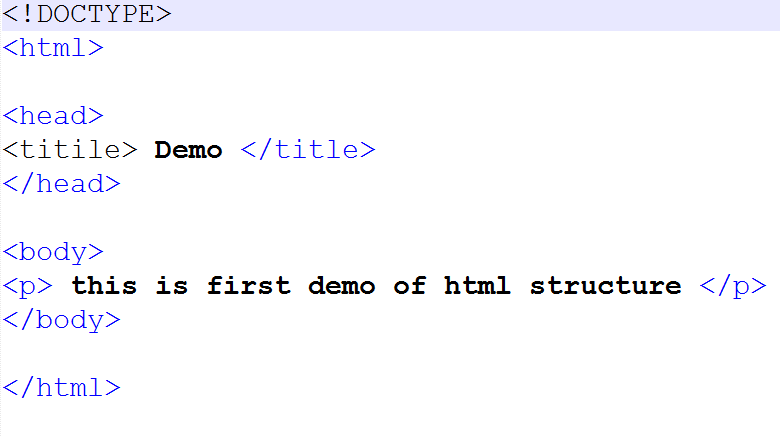
A Simple HTML Document
HTML stands for Hyper Text Markup Language
HTML is the standard markup language for creating Web pages
HTML describes the structure of a Web page
HTML consists of a series of elements
HTML elements tell the browser how to display the content
HTML elements label pieces of content such as "this is a heading", "this is a paragraph", "this is a link", etc.
HTML Documents
All HTML documents must start with a document type declaration: <!DOCTYPE html>.
The HTML document itself begins with <html> and ends with </html>.
The visible part of the HTML document is between <body> and </body>.
HTML Headings
HTML headings are defined with the <h1> to <h6> tags.
<h1> defines the most important heading. <h6> defines the least important heading:
HTML Paragraphs
HTML paragraphs are defined with the <p> tag:
HTML Links
HTML links are defined with the <a> tag:
HTML Images
HTML images are defined with the <img> tag.
The source file (src), alternative text (alt),
width, and height are provided as attributes:
HTML
All HTML documents must start with a document type declaration: <!DOCTYPE html>.
The HTML document itself begins with <html> and ends with </html>.
The visible part of the HTML document is between <body> and </body>.
HTML Headings
HTML headings are defined with the <h1> to <h6> tags.
<h1> defines the most important heading. <h6> defines the least important heading:
HTML Paragraphs
HTML paragraphs are defined with the <p> tag:
HTML Links
HTML links are defined with the <a> tag:
HTML Images
HTML images are defined with the <img> tag.
The source file (src), alternative text (alt),
width, and height are provided as attributes:
HTML Attributes
All HTML elements can have attributes
Attributes provide additional information about elements
Attributes are always specified in the start tag
Attributes usually come in name/value pairs like: name="value"
The href Attribute
The <a> tag defines a hyperlink. The
href attribute specifies the URL of the page
the link goes to:
The src Attribute
The <img> tag is used to embed an
image in an HTML page. The src attribute
specifies the path to the image to be displayed:
The width and height Attributes
The <img> tag should also contain the
width and
height attributes, which specify the width and
height of the image (in pixels):
The alt Attribute
The required alt attribute for the <img>
tag specifies an
alternate text for an image, if the image for some reason cannot be displayed.
This can be due to
a slow connection, or an error in the src attribute, or if the user uses a screen
reader.
The style Attribute
The style attribute is used to add styles to
an element, such as color, font, size, and more.
The required alt attribute for the <img>
tag specifies an
alternate text for an image, if the image for some reason cannot be displayed.
This can be due to
a slow connection, or an error in the src attribute, or if the user uses a screen
reader.
The lang Attribute
You should always include the lang attribute
inside the <html> tag, to declare the
language of the Web page. This is meant to assist search engines and browsers.
The title Attribute
The title attribute defines some extra
information about an
element.
HTML Headings
HTML headings are titles or subtitles that you want to display on a webpage
HTML headings are defined with the <h1> to <h6> tags.
<h1> defines the most important heading. <h6> defines the least important heading.
Headings Are Important
Search engines use the headings to index the structure and content of your web pages.
Users often skim a page by its headings. It is important to use headings to show the document structure.
<h1> headings should be used for main headings, followed by <h2> headings, then the less important
<h3>, and so on.
Bigger Headings
Each HTML heading has a default size. However, you can specify the size for any heading
with the style attribute, using the CSS font-size property:
HTML Paragraphs
The HTML <p> element defines a paragraph.
A paragraph always starts on a new line, and browsers automatically add some white space (a margin) before and after a paragraph.
HTML Horizontal Rules
The <hr> tag defines a thematic break in an HTML page, and is most often
displayed as a horizontal rule.
The <hr> element is used to separate content (or define a change) in an HTML
page:
HTML Line Breaks
The HTML <br> element defines a line break.
Use <br> if you want a line break (a new line) without starting a new paragraph:
The HTML <pre> Element
The HTML <pre> element defines preformatted text.
The text inside a <pre> element is displayed in a fixed-width font (usually
Courier), and it preserves both spaces and line breaks:
HTML Styles
The HTML style attribute is used to add styles to an element, such as color, font, size, and more.
The HTML Style Attribute
Setting the style of an HTML element, can be done with the style attribute.
The HTML style attribute has the following syntax:
<tagname
style="property:value;">
The property is a CSS property. The value is a CSS value.
Background Color
The CSS background-color property defines the background color
for an HTML element.
Text Color
The CSS color property defines the text color for
an HTML element
Fonts
The CSS font-family property defines the font to be used
for an HTML element
Text Size
The CSS font-size property defines the text size for
an HTML element
Text Alignment
The CSS text-align property defines the horizontal text alignment for an HTML element
HTML Text Formatting
HTML contains several elements for defining text with a special meaning.
HTML Formatting Elements
<b>- Bold text<strong>- Important text<i>- Italic text<em>- Emphasized text<mark>- Marked text<small>- Smaller text<del>- Deleted text<ins>- Inserted text<sub>- Subscript text<sup>- Superscript text
The HTML <b> element defines bold text,
without any extra importance.
The HTML <strong> element defines text
with strong importance. The content inside is typically displayed in bold.
The HTML <i> element defines a part of
text in an alternate voice or mood. The content inside is typically displayed in
italic.
The HTML <em> element defines
emphasized text. The content inside is typically displayed in italic.
The HTML <small> element defines
smaller text
The HTML <mark> element defines text
that should be marked or highlighted
The HTML <del> element defines text
that has been deleted from a document. Browsers will usually strike a line
through deleted text
The HTML <ins> element defines a text
that has been inserted into a document. Browsers will usually underline inserted
text
The HTML <sub> element defines
subscript text. Subscript text appears half a character below the normal line,
and is sometimes rendered in a smaller font. Subscript text can be used for
chemical formulas, like H2O
The HTML <sup> element defines
superscript text. Superscript text appears half a character above the normal
line, and is sometimes rendered in a smaller font. Superscript text can be used
for footnotes, like WWW[1]:
Aenean lorem odio, mollis sed consequat et, pellentesque id purus. Nunc sagittis malesuada urna, ultricies lacinia nisi varius vitae. Aliquam sit amet egestas sapien, nec mollis quam.

Olivia Eklund
Tech Journalist
Related Posts
Comments (2)
Homayoun Shakibaii

Niek Bove
Duis interdum suscipit ullamcorper. Proin purus mi, tincidunt eu eros tincidunt, tincidunt
pharetra diam. Etiam congue, massa quis facilisis euismod